目标#
构建一个实用高效的终端开发环境,支持 AI Agent 辅助编程,完善的远程 SSH 开发体验,以及跨设备的工作流同步。
当然也要酷炫好看,参考头图!
我的配置repo ↗,涉及到的配置文件都在此仓库中,欢迎参考。
本篇博客将介绍终端美化,其他内容见:
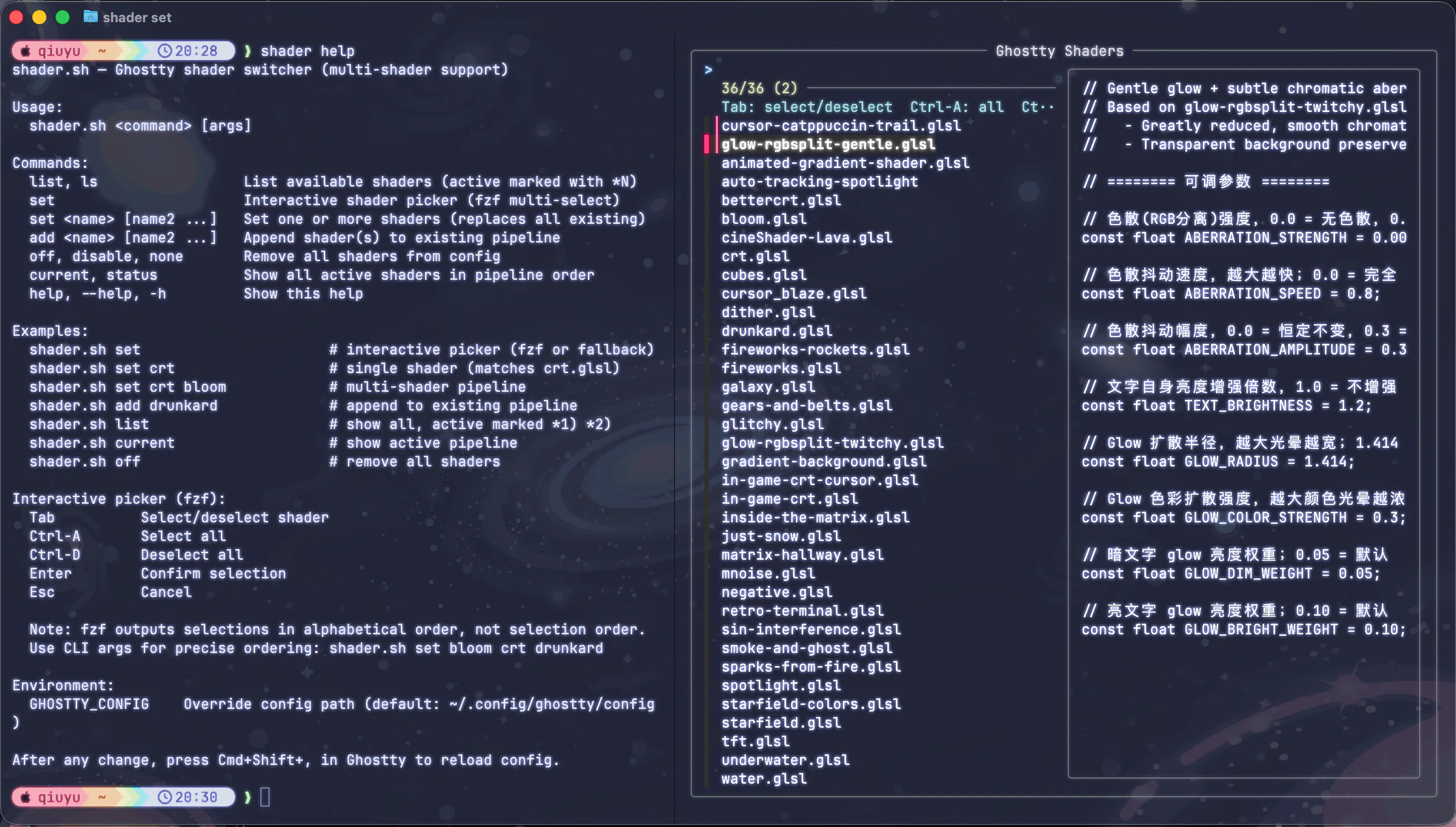
主题美化#
目标是打造统一的 Neon/Glow 风格:暗色底调 + 半透明毛玻璃背景 + 高亮发光的文字与边框。
渲染层级说明:#
Ghostty → TUI 程序(Neovim / btop)
Ghostty 作为最外层的终端模拟器,负责渲染终端背景、透明度和字体。当你在其中打开 Neovim 或 btop 时,这些程序会绘制自己的前景内容——但底层的透明与模糊效果始终来自 Ghostty。
策略:所有工具统一使用我非常喜欢的 Catppuccin Macchiato,在 Ghostty 中实现透明和 Neon/Glow 等效果。Catppuccin Macchiato配色暗而不沉、色调饱和度恰到好处,天然契合透明和 Neon,且社区生态完善,几乎所有主流工具都有现成的配置 Port。
Catppuccin 官网的 Ports 列表 ↗ 收录了大量社区贡献的工具主题,基本上用到的工具都能在里面找到。
第一步:各工具主题统一#
1. Ghostty#
编辑 ~/.config/ghostty/config:
theme = Catppuccin Macchiato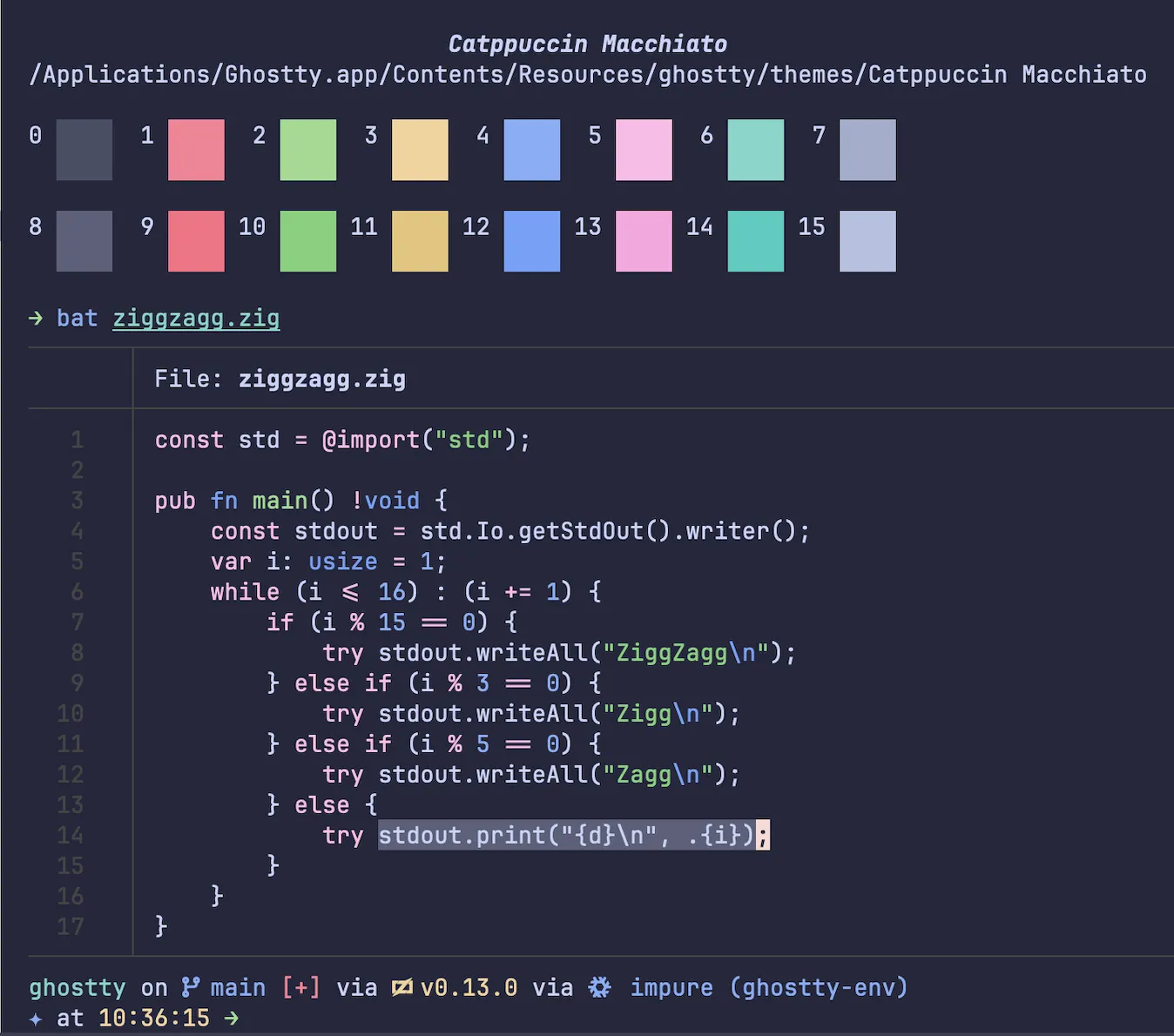
2. Starship#
# 一键生成 Catppuccin Powerline 预设
starship preset catppuccin-powerline -o ~/.config/starship.toml生成后编辑 ~/.config/starship.toml,将默认的 mocha 改为 macchiato:
palette = 'catppuccin_macchiato'
3. LazyVim / Neovim#
LazyVim 默认内置了 Catppuccin 插件。编辑 ~/.config/nvim/lua/plugins/colorscheme.lua,以下写法支持在多个主题间快速切换,修改顶部的 theme 变量即可:
-- ~/.config/nvim/lua/plugins/colorscheme.lua
local theme = "catppuccin"

if theme == "catppuccin" then
  return {
    {
      "catppuccin/nvim",
      name = "catppuccin",
      opts = {
        flavour = "macchiato",
        transparent_background = true, -- 允许背景穿透,透出 Ghostty 的透明层
        styles = {
          sidebars = "transparent",
          floats   = "transparent",
        },
      },
    },
    { "LazyVim/LazyVim", opts = { colorscheme = "catppuccin" } },
  }
elseif theme == "monokai-pro" then
  return {
    { "loctvl842/monokai-pro.nvim", opts = { filter = "pro" } },
    { "LazyVim/LazyVim", opts = { colorscheme = "monokai-pro" } },
  }
end

return {}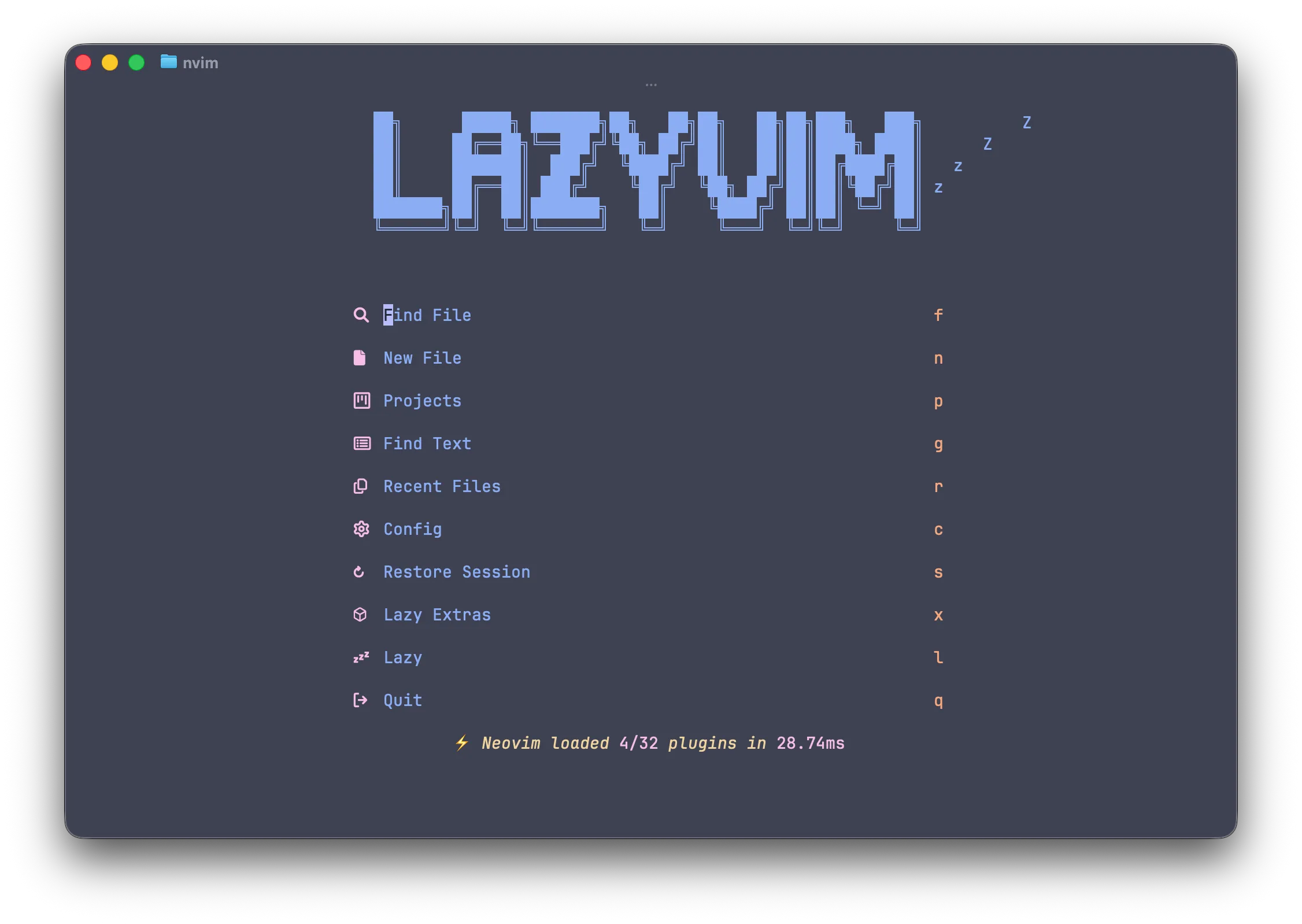
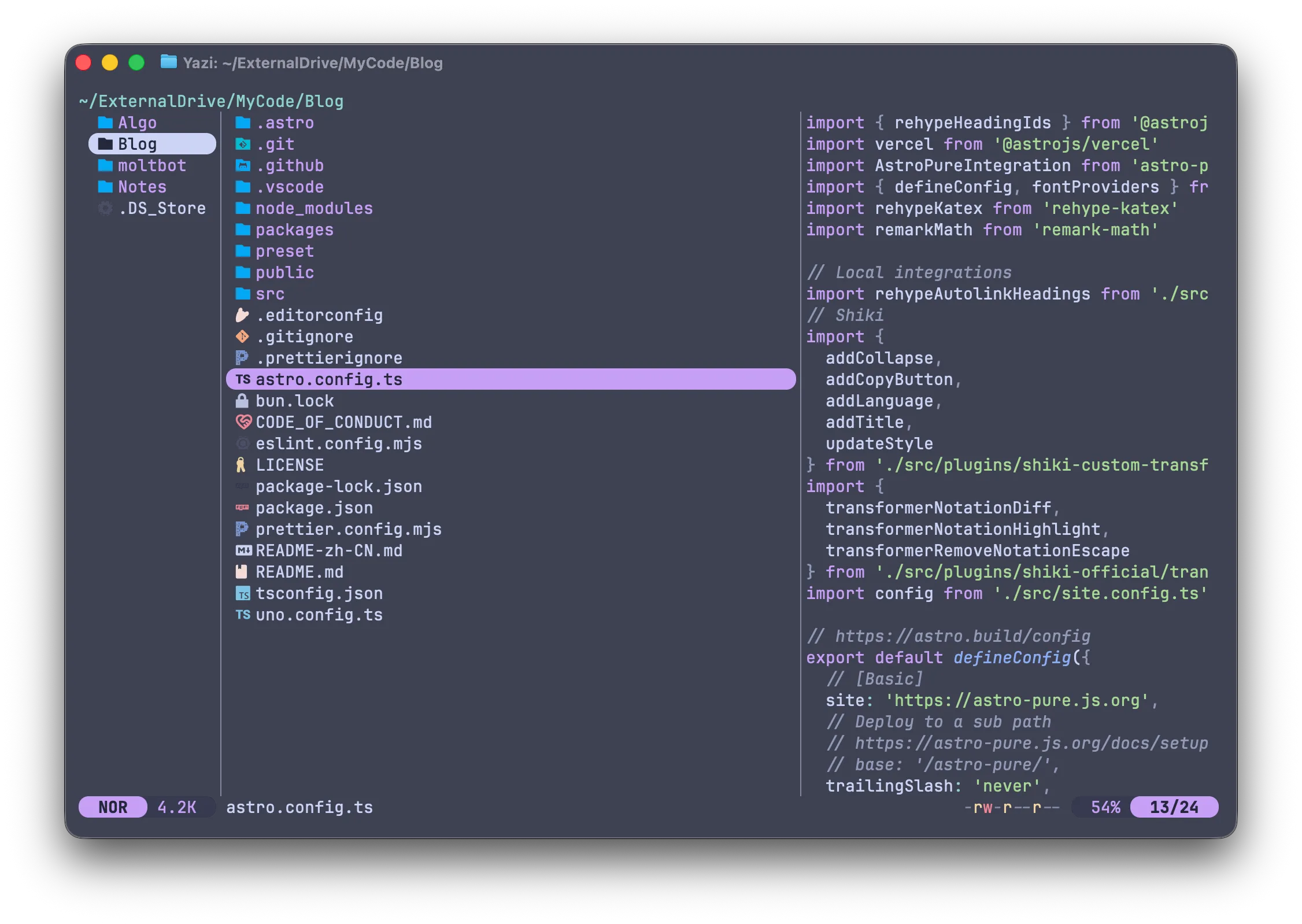
4. Yazi#
配置较长,参考官方仓库:catppuccin/yazi ↗
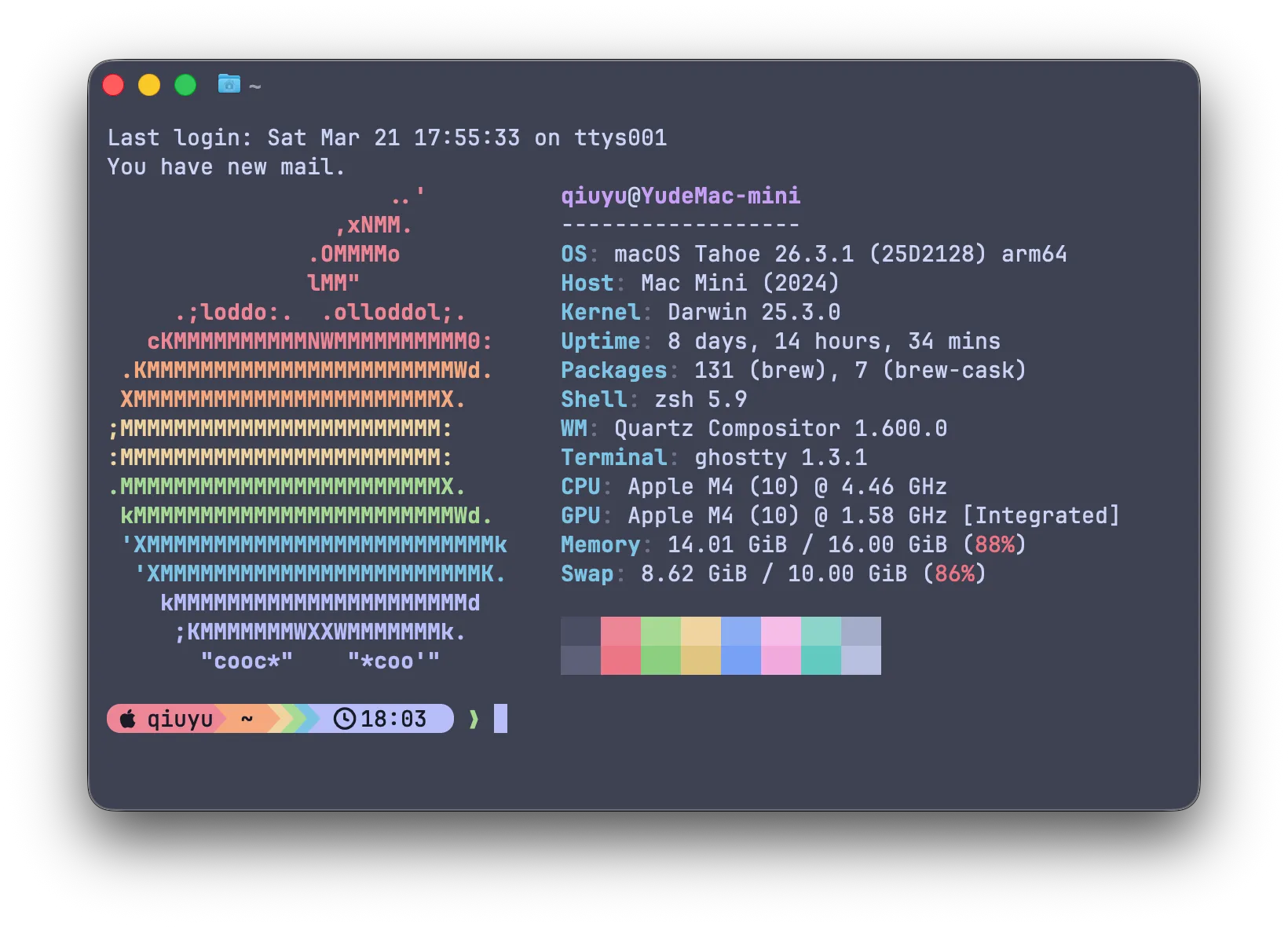
5. Fastfetch#
fastfetch --gen-config # 生成默认配置文件编辑 ~/.config/fastfetch/config.jsonc,替换为以下内容,应用 Macchiato 调色:
{
  "$schema": "https://github.com/fastfetch-cli/fastfetch/raw/master/doc/json_schema.json",
  "modules": [
    "title", "separator", "os", "host", "kernel", "uptime",
    "packages", "shell", "de", "wm", "terminal",
    "cpu", "gpu", "memory", "swap", "break", "colors"
  ],
  "display": {
    "color": {
      "keys":      "38;2;125;196;228",
      "title":     "38;2;198;160;246",
      "output":    "38;2;202;211;245",
      "separator": "38;2;110;115;141"
    }
  },
  "logo": {
    "color": {
      "1": "38;2;237;135;150",
      "2": "38;2;245;169;127",
      "3": "38;2;238;212;159",
      "4": "38;2;166;218;149",
      "5": "38;2;125;196;228",
      "6": "38;2;183;189;248"
    }
  }
}
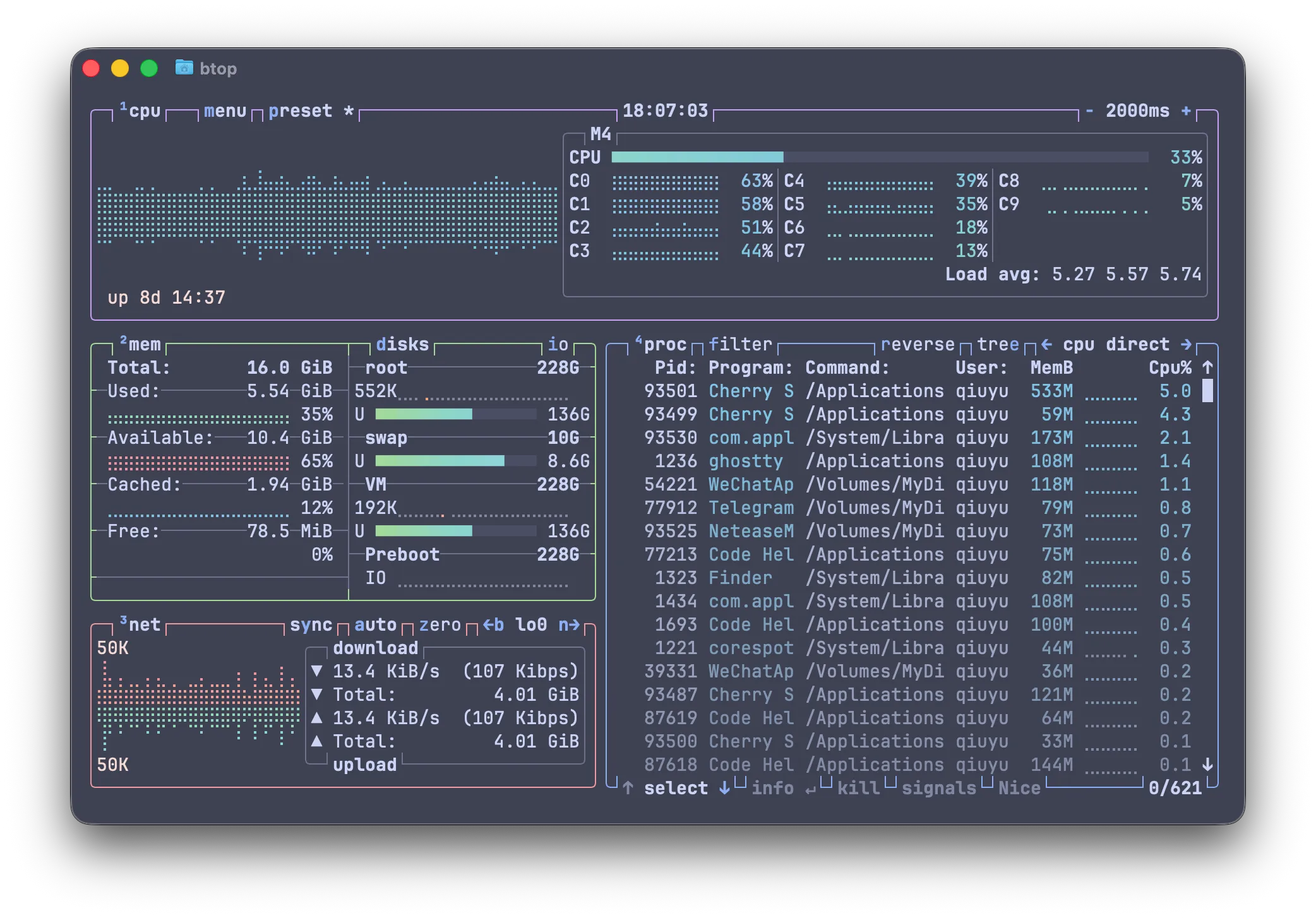
6. btop#
创建主题目录并新建主题文件:
mkdir -p ~/.config/btop/themes
nano ~/.config/btop/themes/catppuccin_macchiato.theme粘贴以下内容:
# 主背景(留空则跟随终端背景,可实现透明穿透)
theme[main_bg]="#24273a"
theme[main_fg]="#cad3f5"
theme[title]="#cad3f5"
theme[hi_fg]="#8aadf4"
theme[selected_bg]="#494d64"
theme[selected_fg]="#8aadf4"
theme[inactive_fg]="#8087a2"
theme[graph_text]="#f4dbd6"
theme[meter_bg]="#494d64"
theme[proc_misc]="#f4dbd6"

# 各模块边框色
theme[cpu_box]="#c6a0f6"   # Mauve
theme[mem_box]="#a6da95"   # Green
theme[net_box]="#ee99a0"   # Maroon
theme[proc_box]="#8aadf4"  # Blue
theme[div_line]="#6e738d"

# 温度渐变:绿 → 黄 → 红
theme[temp_start]="#a6da95"
theme[temp_mid]="#eed49f"
theme[temp_end]="#ed8796"

# CPU 渐变:Teal → Lavender
theme[cpu_start]="#8bd5ca"
theme[cpu_mid]="#7dc4e4"
theme[cpu_end]="#b7bdf8"

# 内存/磁盘 Free:Mauve → Lavender → Blue
theme[free_start]="#c6a0f6"
theme[free_mid]="#b7bdf8"
theme[free_end]="#8aadf4"

# 内存/磁盘 Cached:Sapphire → Lavender
theme[cached_start]="#7dc4e4"
theme[cached_mid]="#8aadf4"
theme[cached_end]="#b7bdf8"

# 内存/磁盘 Available:Peach → Red
theme[available_start]="#f5a97f"
theme[available_mid]="#ee99a0"
theme[available_end]="#ed8796"

# 内存/磁盘 Used:Green → Sky
theme[used_start]="#a6da95"
theme[used_mid]="#8bd5ca"
theme[used_end]="#91d7e3"

# 下载速率:Peach → Red
theme[download_start]="#f5a97f"
theme[download_mid]="#ee99a0"
theme[download_end]="#ed8796"

# 上传速率:Green → Sky
theme[upload_start]="#a6da95"
theme[upload_mid]="#8bd5ca"
theme[upload_end]="#91d7e3"

# 进程渐变:Sapphire → Mauve
theme[process_start]="#7dc4e4"
theme[process_mid]="#b7bdf8"
theme[process_end]="#c6a0f6"进入 btop 后:ESC → Options → Color theme,选择 catppuccin_macchiato。
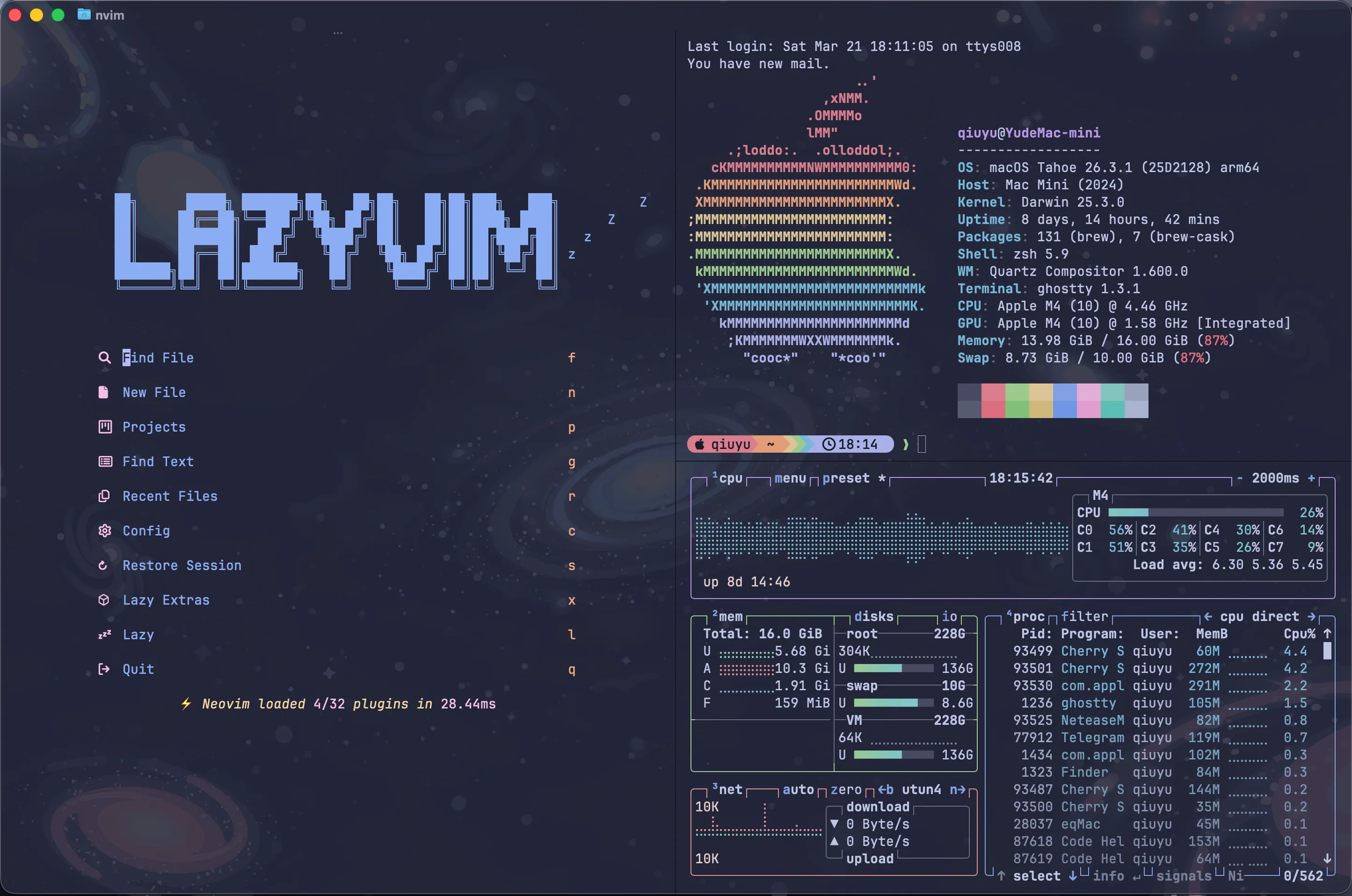
第二步:Ghostty 透明与 Neon 效果#
1. Ghostty 配置#
这是实现毛玻璃透明 + Neon 发光感的核心配置层。编辑 ~/.config/ghostty/config:
# ───────────────────────────────────────
# 透明度(核心参数)
# ───────────────────────────────────────
background-opacity = 0.88
# 范围 0.0 ~ 1.0,0.80–0.88 是 Neon 感甜区
# 过低 → 背景噪点干扰阅读;过高 → 失去透明层次感

unfocused-split-opacity = 0.9
# 非焦点分屏窗格更透明,营造前后景深感

# ───────────────────────────────────────
# 模糊(macOS 自动处理)
# ───────────────────────────────────────
# macOS 下,background-opacity < 1 时
# Ghostty 会自动启用系统级毛玻璃模糊,无需额外配置

# ───────────────────────────────────────
# 字体(影响 Neon 观感的关键细节)
# ───────────────────────────────────────
font-family = JetBrainsMono Nerd Font
# 备选:Maple Mono / Monaspace Neon
font-size = 14
font-thicken = true
# font-thicken 让亮色文字渲染更粗,在透明背景上产生自然的"发光"效果

# ───────────────────────────────────────
# 窗口
# ───────────────────────────────────────
window-padding-x = 12
window-padding-y = 8
# window-decoration = false       # 取消注释可去掉标题栏,更沉浸
# macos-titlebar-style = hidden   # macOS 专用沉浸风格

# ───────────────────────────────────────
# 光标(细节增强 Neon 感)
# ───────────────────────────────────────
cursor-style = block
cursor-style-blink = true
shell-integration-features = no-cursor
cursor-color = #b7bdf8
# Catppuccin Macchiato 的 Lavender 色2. TUI 程序背景穿透#
Ghostty 的透明度只作用于自身的背景层。Neovim、btop 等 TUI 程序默认会绘制实色背景,会把底层的透明效果遮住。需要单独让它们”放弃”自己的背景色,透出 Ghostty 的透明层。
btop:一行命令修改配置:
sed -i '' 's/theme_background = true/theme_background = false/' ~/.config/btop/btop.confNeovim:在 colorscheme 配置中开启 transparent_background = true,已包含在第一步的 Neovim 配置里,无需重复操作。
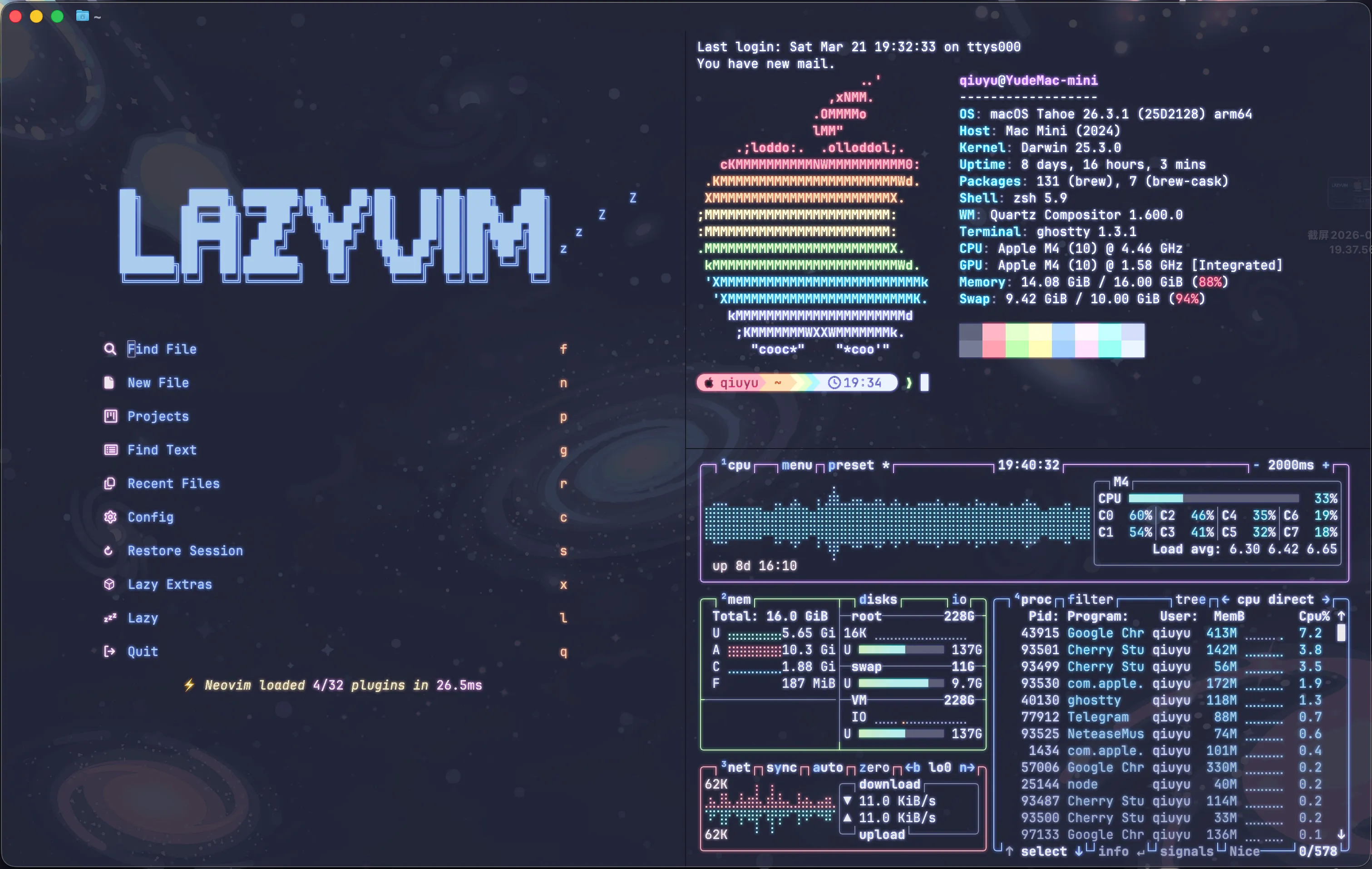
第三步(进阶):Shader 与光标动画#
前面的配置属于静态美化层——颜色统一、背景透明。想要更进一步,让光标跳跃时有拖尾发光效果、画面带有 Bloom/Glow 质感,需要进入 Ghostty 的 Shader 层。
1. 原理#
Ghostty 支持在 GPU 渲染管线末尾注入自定义 GLSL 片段着色器(custom-shader),对终端的最终输出画面做像素级后处理。由于它作用于 Ghostty 整个渲染帧,效果是全局的——Neovim、btop、普通 Shell 皆可受益,无需对每个程序单独配置。
# ~/.config/ghostty/config
custom-shader = ~/.config/ghostty/shaders/your-shader.glsl
custom-shader-animation = true # 启用时间驱动动画(光标拖尾、闪烁效果等)2. 获取 Shader#
GitHub 上有大量社区贡献的 Ghostty shader,搜索 ghostty shaders 即可找到。我把常用仓库直接 clone 到 Ghostty 配置目录下统一管理,自己写的 shader 也放在同一目录,这样所有 shader 集中在 ~/.config/ghostty/shaders/。
推荐shader仓库 ↗
3. 霓虹/辉光 Shader#
「霓虹/辉光」的效果,就是通过这个 shader 实现的。
基于社区 glow-rgbsplit-twitchy.glsl 改写,主要改动:色散改为平滑动画(去掉原版过强的随机抖动噪声)、完整保留 Ghostty 背景透明的 alpha 通道、集中参数便于调整。
效果由三层叠加构成:
- 文字增亮:亮度超过阈值的像素(文字本身)在 Oklab 色彩空间中直接提升明度,呈现清脆的霓虹质感
- Glow 扩散:暗像素向周围 24 个邻居螺旋采样(权重随距离衰减),将邻近亮像素的颜色和亮度「渗入」当前像素,形成柔和的彩色光晕
- RGB 色散:对 R/B 通道分别向左/右微量偏移采样,模拟镜头色差,增加赛博感;色散量随时间缓慢波动,不会死板
- 透明度保留:alpha passthrough,不破坏 Ghostty 的背景透明效果
颜色空间:所有亮度判断和 glow 计算均在 Oklab(感知均匀色彩空间)中完成,避免直接操作 sRGB 导致的色调偏移——glow 扩散后颜色依然准确、无偏色。
顶部可调参数:
const float ABERRATION_STRENGTH = 0.008; // 色散强度,0.0 = 无,0.008 = 微弱,0.05 = 原版强度
const float ABERRATION_SPEED    = 0.8;   // 色散抖动速度,0.0 = 完全静止
const float ABERRATION_AMPLITUDE= 0.3;   // 色散抖动幅度,0.0 = 恒定不变
const float TEXT_BRIGHTNESS     = 1.2;   // 文字自身亮度倍数,1.0 = 不增强,1.5 = 极亮
const float GLOW_RADIUS         = 1.414; // Glow 扩散半径(像素),越大光晕越宽
const float GLOW_COLOR_STRENGTH = 0.3;   // 颜色光晕浓度,越大彩色光晕越明显
const float DIM_CUTOFF          = 0.35;  // 暗/亮分界阈值(低于接受 glow,高于自身增亮)
const float BRIGHT_CUTOFF = 0.65; // 超过此值的邻居贡献更强 glowglow-rgbsplit-gentle.glsl · 在 GitHub 查看
// Gentle glow + subtle chromatic aberration shader with transparency support
// Based on glow-rgbsplit-twitchy.glsl but with:
//   - Greatly reduced, smooth chromatic aberration (no twitchy jitter)
//   - Transparent background preserved (alpha passthrough)

// ======== 可调参数 ========

// 色散(RGB分离)强度,0.0 = 无色散,0.008 = 微弱,0.05 = 原版强度
const float ABERRATION_STRENGTH = 0.008;

// 色散抖动速度,越大越快;0.0 = 完全静止
const float ABERRATION_SPEED = 0.8;

// 色散抖动幅度,0.0 = 恒定不变,0.3 = 轻微波动
const float ABERRATION_AMPLITUDE = 0.3;

// 文字自身亮度增强倍数,1.0 = 不增强,1.2 = 默认,1.5 = 很亮
const float TEXT_BRIGHTNESS = 1.2;

// Glow 扩散半径,越大光晕越宽;1.414 = 默认,2.5 = 大范围,0.8 = 紧凑
const float GLOW_RADIUS = 1.414;

// Glow 色彩扩散强度,越大颜色光晕越浓;0.3 = 默认
const float GLOW_COLOR_STRENGTH = 0.3;

// 暗文字 glow 亮度权重;0.05 = 默认
const float GLOW_DIM_WEIGHT = 0.05;

// 亮文字 glow 亮度权重;0.10 = 默认
const float GLOW_BRIGHT_WEIGHT = 0.10;

// 暗/亮分界阈值 — 低于此值的像素接受 glow,高于的自身增亮
const float DIM_CUTOFF = 0.35;

// 亮度上限阈值 — 超过此值的邻居贡献更强 glow
const float BRIGHT_CUTOFF = 0.65;

// ======== 参数结束 ========

// sRGB linear -> nonlinear transform from https://bottosson.github.io/posts/colorwrong/
float f(float x) {
    if (x >= 0.0031308) {
        return 1.055 * pow(x, 1.0 / 2.4) - 0.055;
    } else {
        return 12.92 * x;
    }
}

float f_inv(float x) {
    if (x >= 0.04045) {
        return pow((x + 0.055) / 1.055, 2.4);
    } else {
        return x / 12.92;
    }
}

// Oklab <-> linear sRGB conversions from https://bottosson.github.io/posts/oklab/
vec4 toOklab(vec4 rgb) {
    vec3 c = vec3(f_inv(rgb.r), f_inv(rgb.g), f_inv(rgb.b));
    float l = 0.4122214708 * c.r + 0.5363325363 * c.g + 0.0514459929 * c.b;
    float m = 0.2119034982 * c.r + 0.6806995451 * c.g + 0.1073969566 * c.b;
    float s = 0.0883024619 * c.r + 0.2817188376 * c.g + 0.6299787005 * c.b;
    float l_ = pow(l, 1.0 / 3.0);
    float m_ = pow(m, 1.0 / 3.0);
    float s_ = pow(s, 1.0 / 3.0);
    return vec4(
        0.2104542553 * l_ + 0.7936177850 * m_ - 0.0040720468 * s_,
        1.9779984951 * l_ - 2.4285922050 * m_ + 0.4505937099 * s_,
        0.0259040371 * l_ + 0.7827717662 * m_ - 0.8086757660 * s_,
        rgb.a
    );
}

vec4 toRgb(vec4 oklab) {
    vec3 c = oklab.rgb;
    float l_ = c.r + 0.3963377774 * c.g + 0.2158037573 * c.b;
    float m_ = c.r - 0.1055613458 * c.g - 0.0638541728 * c.b;
    float s_ = c.r - 0.0894841775 * c.g - 1.2914855480 * c.b;
    float l = l_ * l_ * l_;
    float m = m_ * m_ * m_;
    float s = s_ * s_ * s_;
    vec3 linear_srgb = vec3(
         4.0767416621 * l - 3.3077115913 * m + 0.2309699292 * s,
        -1.2684380046 * l + 2.6097574011 * m - 0.3413193965 * s,
        -0.0041960863 * l - 0.7034186147 * m + 1.7076147010 * s
    );
    return vec4(
        clamp(f(linear_srgb.r), 0.0, 1.0),
        clamp(f(linear_srgb.g), 0.0, 1.0),
        clamp(f(linear_srgb.b), 0.0, 1.0),
        oklab.a
    );
}

// Bloom samples from https://gist.github.com/qwerasd205/c3da6c610c8ffe17d6d2d3cc7068f17f
const vec3[24] samples = {
  vec3(0.1693761725038636, 0.9855514761735895, 1),
  vec3(-1.333070830962943, 0.4721463328627773, 0.7071067811865475),
  vec3(-0.8464394909806497, -1.51113870578065, 0.5773502691896258),
  vec3(1.554155680728463, -1.2588090085709776, 0.5),
  vec3(1.681364377589461, 1.4741145918052656, 0.4472135954999579),
  vec3(-1.2795157692199817, 2.088741103228784, 0.4082482904638631),
  vec3(-2.4575847530631187, -0.9799373355024756, 0.3779644730092272),
  vec3(0.5874641440200847, -2.7667464429345077, 0.35355339059327373),
  vec3(2.997715703369726, 0.11704939884745152, 0.3333333333333333),
  vec3(0.41360842451688395, 3.1351121305574803, 0.31622776601683794),
  vec3(-3.167149933769243, 0.9844599011770256, 0.30151134457776363),
  vec3(-1.5736713846521535, -3.0860263079123245, 0.2886751345948129),
  vec3(2.888202648340422, -2.1583061557896213, 0.2773500981126146),
  vec3(2.7150778983300325, 2.5745586041105715, 0.2672612419124244),
  vec3(-2.1504069972377464, 3.2211410627650165, 0.2581988897471611),
  vec3(-3.6548858794907493, -1.6253643308191343, 0.25),
  vec3(1.0130775986052671, -3.9967078676335834, 0.24253562503633297),
  vec3(4.229723673607257, 0.33081361055181563, 0.23570226039551587),
  vec3(0.40107790291173834, 4.340407413572593, 0.22941573387056174),
  vec3(-4.319124570236028, 1.159811599693438, 0.22360679774997896),
  vec3(-1.9209044802827355, -4.160543952132907, 0.2182178902359924),
  vec3(3.8639122286635708, -2.6589814382925123, 0.21320071635561041),
  vec3(3.3486228404946234, 3.4331800232609, 0.20851441405707477),
  vec3(-2.8769733643574344, 3.9652268864187157, 0.20412414523193154)
};

void mainImage(out vec4 fragColor, in vec2 fragCoord) {
    vec2 uv = fragCoord.xy / iResolution.xy;

    float amount = 1.0 + ABERRATION_AMPLITUDE * sin(iTime * ABERRATION_SPEED);

    // Sample original pixel alpha for transparency
    vec4 origSample = texture(iChannel0, uv);
    float alpha = origSample.a;

    // If fully transparent, pass through immediately
    if (alpha < 0.001) {
        fragColor = vec4(0.0);
        return;
    }

    // Subtle chromatic aberration
    vec3 col;
    col.r = texture(iChannel0, vec2(uv.x - ABERRATION_STRENGTH * amount / iResolution.x, uv.y)).r;
    col.g = origSample.g;
    col.b = texture(iChannel0, vec2(uv.x + ABERRATION_STRENGTH * amount / iResolution.x, uv.y)).b;

    vec4 splittedColor = vec4(col, alpha);
    vec4 source = toOklab(splittedColor);
    vec4 dest = source;

    if (source.x > DIM_CUTOFF) {
        dest.x *= TEXT_BRIGHTNESS;
    } else {
        vec2 step = vec2(GLOW_RADIUS) / iResolution.xy;
        vec3 glow = vec3(0.0);
        for (int i = 0; i < 24; i++) {
            vec3 s = samples[i];
            float weight = s.z;
            vec4 neighborTexel = texture(iChannel0, uv + s.xy * step);
            // Only glow from non-transparent neighbors
            if (neighborTexel.a < 0.001) continue;
            vec4 c = toOklab(neighborTexel);
            if (c.x > DIM_CUTOFF) {
                glow.yz += c.yz * weight * GLOW_COLOR_STRENGTH;
                if (c.x <= BRIGHT_CUTOFF) {
                    glow.x += c.x * weight * GLOW_DIM_WEIGHT;
                } else {
                    glow.x += c.x * weight * GLOW_BRIGHT_WEIGHT;
                }
            }
        }
        dest.xyz += glow.xyz;
    }

    vec4 result = toRgb(dest);
    // Preserve original alpha so Ghostty transparency works
    fragColor = vec4(result.rgb, alpha);
}
4. 光标拖尾 Shader#
「光标跳跃留下发光拖尾」的效果,就是通过这个 shader 实现的。
为什么选择在 Ghostty Shader 层而非 Neovim 插件实现:Shader 作用于 Ghostty 的最终渲染帧,对所有在其中运行的程序全局生效——Shell、Neovim、btop 同样受益,无需针对每个工具单独配置,效果也更统一。
效果机制:
- 光标移动时,连接前后位置绘制一个平行四边形拖尾,宽度与光标块一致
- 亮度与移动距离成比例:单步
h/j/k/l有微弱拖尾,gg/G//等大幅跳跃产生明亮完整的拖尾 - 纯加法混合:只增加亮度,永不使画面变暗
- 颜色采用 Catppuccin Macchiato 的 Lavender-Mauve,与整体主题一致
顶部几个可调参数:
const vec3  TRAIL_COLOR  = vec3(0.792, 0.741, 0.973); // 拖尾颜色,注释中有多种 Macchiato 备选色
const float DURATION     = 0.5;   // 拖尾消散时长(秒)
const float BRIGHTNESS   = 0.75;  // 整体亮度(0.0 ~ 1.0)
const float MIN_DISTANCE = 0.003; // 触发拖尾的最小移动距离(过滤光标抖动噪声)cursor-catppuccin-trail.glsl · 在 GitHub 查看
// cursor-catppuccin-trail.glsl
// Parallelogram cursor trail for Ghostty — works globally in all programs including Neovim.
//
// Why it works in Neovim (unlike cursor_blaze.glsl):
//   1. Uses UV coordinate system (0~1) from in-game-crt-cursor.glsl, which is
//      proven compatible with how Ghostty reports cursor position inside Neovim.
//   2. No hard distance cutoff — trail brightness scales proportionally with
//      movement distance, so even single h/j/k/l presses show a faint trail.
//      Large jumps (gg, G, /, w, b…) show a brighter, fuller trail.
//
// Shape: same parallelogram as cursor_blaze.glsl — same width as block cursor,
//        connecting previous position to current position as a straight streak.
//
// Blend: pure additive — only ever brightens pixels, NEVER darkens anything.
//
// Colors: Catppuccin Macchiato palette.


// ── Trail fill color ──────────────────────────────────────────────────────────
// Uncomment ONE line. The color that fills the parallelogram body.
const vec3 TRAIL_COLOR = vec3(0.792, 0.741, 0.973);  // Lavender-Mauve #caa0f8  ← default, soft purple-white
// const vec3 TRAIL_COLOR = vec3(0.788, 0.824, 0.961);  // Text         #c9d2f5  — near-white, closest to body text
// const vec3 TRAIL_COLOR = vec3(1.000, 1.000, 1.000);  // Pure white              — maximum contrast, classic neon
// const vec3 TRAIL_COLOR = vec3(0.694, 0.749, 0.973);  // Lavender     #b1bff8  — cool blue-white
// const vec3 TRAIL_COLOR = vec3(0.541, 0.678, 0.957);  // Blue         #8aadf4  — clearly blue, clean
// const vec3 TRAIL_COLOR = vec3(0.545, 0.835, 0.792);  // Teal         #8bd5ca  — cyan-green
// const vec3 TRAIL_COLOR = vec3(0.357, 0.839, 0.898);  // Sky          #5bd7e5  — bright cyan
// const vec3 TRAIL_COLOR = vec3(0.784, 0.627, 0.965);  // Mauve        #c6a0f6  — purple


// ── Settings ──────────────────────────────────────────────────────────────────

// How long the trail stays visible after the cursor stops (seconds).
const float DURATION = 0.5;

// Overall brightness of the trail (0.0 ~ 1.0).
const float BRIGHTNESS = 0.75;

// Minimum movement in UV units before any trail appears.
// 0.003 ≈ sub-pixel jitter filter — effectively shows on every character movement,
// including single h/j/k/l presses in Neovim.
// Raise to 0.01+ to only show on multi-character jumps.
const float MIN_DISTANCE = 0.003;


// ── SDF helpers ───────────────────────────────────────────────────────────────

float _seg(in vec2 p, in vec2 a, in vec2 b, inout float s, float d) {
    vec2 e = b - a, w = p - a;
    vec2 proj = a + e * clamp(dot(w, e) / (dot(e, e) + 1e-9), 0.0, 1.0);
    d = min(d, dot(p - proj, p - proj));
    float c0 = step(0.0, p.y - a.y);
    float c1 = 1.0 - step(0.0, p.y - b.y);
    float c2 = 1.0 - step(0.0, e.x * w.y - e.y * w.x);
    float allC  = c0 * c1 * c2;
    float noneC = (1.0 - c0) * (1.0 - c1) * (1.0 - c2);
    s *= mix(1.0, -1.0, step(0.5, allC + noneC));
    return d;
}

float sdfParallelogram(vec2 p, vec2 v0, vec2 v1, vec2 v2, vec2 v3) {
    float s = 1.0, d = dot(p - v0, p - v0);
    d = _seg(p, v0, v3, s, d);
    d = _seg(p, v1, v0, s, d);
    d = _seg(p, v2, v1, s, d);
    d = _seg(p, v3, v2, s, d);
    return s * sqrt(d);
}

// Anti-aliased edge: 1.0 inside shape, 0.0 outside, smooth over ~1.5 pixels.
float aaMask(float sdf) {
    float aaWidth = 1.5 / min(iResolution.x, iResolution.y);
    return 1.0 - smoothstep(0.0, aaWidth, sdf);
}

// Smooth s-curve for progress animation.
float blendCurve(float t) {
    float s = t * t;
    return s / (2.0 * (s - t) + 1.0);
}

// Returns 0.0 or 1.0 to pick which corner of the cursor block leads the trail,
// ensuring the parallelogram connects prev→curr cleanly for any movement direction.
float startCorner(vec2 curr, vec2 prev) {
    float c1 = step(curr.x, prev.x) * step(prev.y, curr.y);  // moved left+up
    float c2 = step(prev.x, curr.x) * step(curr.y, prev.y);  // moved right+down
    return 1.0 - max(c1, c2);
}


// ── Main ──────────────────────────────────────────────────────────────────────

void mainImage(out vec4 fragColor, in vec2 fragCoord) {
    // UV coordinate system — same convention as in-game-crt-cursor.glsl.
    // Both fragCoord and iCurrentCursor use OpenGL pixel space (y=0 at bottom),
    // so dividing by iResolution gives a consistent [0,1] UV for both.
    vec2 uv = fragCoord.xy / iResolution.xy;
    fragColor = texture(iChannel0, uv);

    // Cursor positions in UV space.
    // xy = top edge of cursor block; center = top + (halfWidth, -halfHeight).
    vec2 currPos  = iCurrentCursor.xy  / iResolution.xy;
    vec2 currSize = iCurrentCursor.zw  / iResolution.xy;
    vec2 prevPos  = iPreviousCursor.xy / iResolution.xy;
    vec2 prevSize = iPreviousCursor.zw / iResolution.xy;

    vec2 currCenter = currPos + currSize * vec2( 0.5, -0.5);
    vec2 prevCenter = prevPos + prevSize * vec2( 0.5, -0.5);

    float dist = distance(currCenter, prevCenter);
    if (dist < MIN_DISTANCE) return;

    // Exponential fade after cursor stops.
    float age   = iTime - iTimeCursorChange;
    float tFade = exp(-age * (4.5 / DURATION));
    if (tFade < 0.002) return;

    // Progress along animation curve (0→1 over DURATION seconds).
    float progress = blendCurve(clamp(age / DURATION, 0.0, 1.0));

    // Parallelogram corners — same width as the block cursor.
    // Top of cursor in OpenGL coords = currPos.y; bottom = currPos.y - currSize.y.
    float cf  = startCorner(currCenter, prevCenter);
    float icf = 1.0 - cf;

    vec2 v0 = vec2(currPos.x + currSize.x * cf,  currPos.y - currSize.y);  // curr bottom-A
    vec2 v1 = vec2(currPos.x + currSize.x * icf, currPos.y);               // curr top-B
    vec2 v2 = vec2(prevPos.x + currSize.x * icf, prevPos.y);               // prev top-B
    vec2 v3 = vec2(prevPos.x + currSize.x * cf,  prevPos.y - prevSize.y);  // prev bottom-A

    float sdfTrail = sdfParallelogram(uv, v0, v1, v2, v3);
    float bodyMask = aaMask(sdfTrail);

    // headFade: bright at new cursor position, fades toward old position.
    float headFade = 1.0 - clamp(distance(uv, currCenter) / (dist + 1e-9), 0.0, 1.0);

    // distScale: tiny movements produce a faint trail; large jumps produce full brightness.
    // Saturates at ~8-character jump distance. Minimum 0.15 so even h/l shows something.
    float distScale = clamp(dist / (currSize.x * 8.0), 0.15, 1.0);

    // ── Additive blend — only brightens, never darkens ────────────────────────
    vec3 glow = TRAIL_COLOR * bodyMask * BRIGHTNESS * tFade * headFade * distScale;
    fragColor.rgb = min(fragColor.rgb + glow, vec3(1.0));
}5. shader.sh:热更新切换工具#
每次切换 shader 都要手动修改 ghostty 的 config 文件中 custom-shader 比较繁琐。
使用 shader.sh 脚本,添加到 $PATH 后可以直接用命令行切换 shader,然后在 Ghostty 中按 Cmd+Shift+, 重载配置,实现秒级热更新。
| 命令 | 功能 |
|---|---|
shader.sh list | 列出所有可用 shader,标记当前激活项 |
shader.sh set <name> | 切换到指定 shader(支持模糊名称匹配) |
shader.sh set | 无参数时进入 fzf 交互多选 |
shader.sh add <name> | 在现有 shader 后追加(组成多级管线) |
shader.sh off | 禁用所有 shader |
shader.sh current | 查看当前激活的 shader 管线 |
shader.sh · 在 GitHub 查看
#!/opt/homebrew/bin/bash
set -euo pipefail

# Resolve the directory where this script (and the shaders) live
SCRIPT_DIR="$(cd "$(dirname "${BASH_SOURCE[0]}")" && pwd)"

# Ghostty config path — override with GHOSTTY_CONFIG env var if needed
GHOSTTY_CONFIG="${GHOSTTY_CONFIG:-$HOME/.config/ghostty/config}"

# ---------- Shader discovery ----------

discover_shaders() {
    local shaders=()
    # .glsl files
    for f in "$SCRIPT_DIR"/*.glsl; do
        [[ -f "$f" ]] && shaders+=("$(basename "$f")")
    done
    # Extensionless files containing mainImage (e.g. auto-tracking-spotlight)
    for f in "$SCRIPT_DIR"/*; do
        [[ -f "$f" ]] || continue
        local name
        name="$(basename "$f")"
        # Skip .glsl (already found), skip dotfiles, skip known non-shaders
        [[ "$name" == *.* ]] && continue
        if grep -q 'mainImage' "$f" 2>/dev/null; then
            shaders+=("$name")
        fi
    done
    printf '%s\n' "${shaders[@]}" | sort
}

# ---------- Config helpers ----------

ensure_config() {
    local dir
    dir="$(dirname "$GHOSTTY_CONFIG")"
    if [[ ! -d "$dir" ]]; then
        mkdir -p "$dir"
    fi
    if [[ ! -f "$GHOSTTY_CONFIG" ]]; then
        touch "$GHOSTTY_CONFIG"
    fi
}

# Return ALL custom-shader paths from config, one per line, in order.
get_current_shaders() {
    if [[ ! -f "$GHOSTTY_CONFIG" ]]; then
        return
    fi
    grep '^custom-shader' "$GHOSTTY_CONFIG" | sed 's/^custom-shader[[:space:]]*=[[:space:]]*//' || true
}

# Return only the last custom-shader path (backward compat wrapper).
get_current_shader() {
    get_current_shaders | tail -1
}

# Atomically update the config: remove all custom-shader lines, append new ones.
# Pass zero or more absolute paths as arguments. Zero args = remove all.
update_config() {
    ensure_config

    local tmpfile
    tmpfile="$(dirname "$GHOSTTY_CONFIG")/.config.tmp.$$"

    # Remove existing custom-shader lines
    grep -v '^custom-shader' "$GHOSTTY_CONFIG" > "$tmpfile" || true

    # Remove trailing blank lines from temp file, then ensure single trailing newline
    sed -i '' -e :a -e '/^\n*$/{$d;N;ba' -e '}' "$tmpfile" 2>/dev/null || true
    # Ensure file ends with newline
    if [[ -s "$tmpfile" ]] && [[ "$(tail -c 1 "$tmpfile" | wc -l)" -eq 0 ]]; then
        echo "" >> "$tmpfile"
    fi

    # Append new shader lines
    for path in "$@"; do
        if [[ -n "$path" ]]; then
            echo "custom-shader = $path" >> "$tmpfile"
        fi
    done

    mv "$tmpfile" "$GHOSTTY_CONFIG"
}

# ---------- Name resolution ----------

resolve_shader() {
    local input="$1"
    local shaders
    shaders="$(discover_shaders)"

    # 1. Exact filename match
    if echo "$shaders" | grep -qx "$input"; then
        echo "$input"
        return
    fi

    # 2. Append .glsl
    if echo "$shaders" | grep -qx "${input}.glsl"; then
        echo "${input}.glsl"
        return
    fi

    # 3. Case-insensitive exact match
    local ci_match
    ci_match="$(echo "$shaders" | grep -ix "$input" || true)"
    if [[ -n "$ci_match" ]]; then
        local count
        count="$(echo "$ci_match" | wc -l | tr -d ' ')"
        if [[ "$count" -eq 1 ]]; then
            echo "$ci_match"
            return
        fi
    fi

    # 3b. Case-insensitive with .glsl appended
    ci_match="$(echo "$shaders" | grep -ix "${input}.glsl" || true)"
    if [[ -n "$ci_match" ]]; then
        local count
        count="$(echo "$ci_match" | wc -l | tr -d ' ')"
        if [[ "$count" -eq 1 ]]; then
            echo "$ci_match"
            return
        fi
    fi

    # 4. Prefix match (case-insensitive)
    local prefix_matches
    prefix_matches="$(echo "$shaders" | grep -i "^${input}" || true)"
    if [[ -n "$prefix_matches" ]]; then
        local count
        count="$(echo "$prefix_matches" | wc -l | tr -d ' ')"
        if [[ "$count" -eq 1 ]]; then
            echo "$prefix_matches"
            return
        fi
        echo "error:Ambiguous prefix match for '$input'. Matches:" >&2
        echo "$prefix_matches" | sed 's/^/  /' >&2
        return 1
    fi

    # 5. Substring match (case-insensitive)
    local sub_matches
    sub_matches="$(echo "$shaders" | grep -i "${input}" || true)"
    if [[ -n "$sub_matches" ]]; then
        local count
        count="$(echo "$sub_matches" | wc -l | tr -d ' ')"
        if [[ "$count" -eq 1 ]]; then
            echo "$sub_matches"
            return
        fi
        echo "error:Ambiguous substring match for '$input'. Matches:" >&2
        echo "$sub_matches" | sed 's/^/  /' >&2
        return 1
    fi

    echo "error:No shader found matching '$input'" >&2
    return 1
}

# ---------- Preview helper ----------

preview_path() {
    local shader_name="$1"
    local base="${shader_name%.glsl}"
    for ext in png jpg gif; do
        if [[ -f "$SCRIPT_DIR/theme/${base}.${ext}" ]]; then
            echo "$SCRIPT_DIR/theme/${base}.${ext}"
            return
        fi
    done
    echo ""
}

# ---------- Interactive pickers ----------

# fzf-based multi-select shader picker.
# Active shaders are placed first and pre-selected via start binding.
# Outputs selected shader names, one per line.
fzf_pick_shaders() {
    local shaders
    shaders="$(discover_shaders)"

    # Build active shader lookup
    declare -A active_map
    local active_lines
    active_lines="$(get_current_shaders)"
    if [[ -n "$active_lines" ]]; then
        while IFS= read -r apath; do
            local aname
            aname="$(basename "$apath")"
            active_map["$aname"]=1
        done <<< "$active_lines"
    fi

    # Build ordered input: active shaders first, then inactive (each group sorted)
    local active_items=()
    local inactive_items=()
    while IFS= read -r shader; do
        if [[ -n "${active_map[$shader]+x}" ]]; then
            active_items+=("$shader")
        else
            inactive_items+=("$shader")
        fi
    done <<< "$shaders"

    local num_active=${#active_items[@]}
    local fzf_input=""
    for s in "${active_items[@]}"; do
        fzf_input+="$s"$'\n'
    done
    for s in "${inactive_items[@]}"; do
        fzf_input+="$s"$'\n'
    done
    fzf_input="${fzf_input%$'\n'}"

    # Build load action: toggle first N items to pre-select active shaders.
    # Uses 'load' event (fires after input is fully loaded) so toggle has items to act on.
    local load_action="first"
    if [[ $num_active -gt 0 ]]; then
        load_action=""
        for ((i=0; i<num_active; i++)); do
            load_action+="toggle+down+"
        done
        load_action+="first"
    fi

    local selections
    selections="$(echo "$fzf_input" | fzf \
        --multi \
        --no-sort \
        --preview "head -30 '$SCRIPT_DIR/{1}' 2>/dev/null || echo 'No preview available'" \
        --header 'Tab: select/deselect  Ctrl-A: all  Ctrl-D: deselect all  Enter: confirm  Esc: cancel' \
        --layout=reverse \
        --border \
        --border-label=' Ghostty Shaders ' \
        --bind 'ctrl-a:select-all,ctrl-d:deselect-all' \
        --bind "load:${load_action}" \
    )" || {
        echo "Selection cancelled." >&2
        return 1
    }

    if [[ -z "$selections" ]]; then
        echo "Selection cancelled." >&2
        return 1
    fi

    echo "$selections"
}

# Numbered-list fallback picker when fzf is not available.
# Outputs selected shader names, one per line.
fallback_pick_shaders() {
    local shaders
    shaders="$(discover_shaders)"

    # Build active shader lookup
    declare -A active_map
    local active_lines
    active_lines="$(get_current_shaders)"
    if [[ -n "$active_lines" ]]; then
        while IFS= read -r apath; do
            local aname
            aname="$(basename "$apath")"
            active_map["$aname"]=1
        done <<< "$active_lines"
    fi

    # Store shaders in array for index lookup
    local shader_arr=()
    mapfile -t shader_arr <<< "$shaders"

    echo "Available shaders:" >&2
    echo "" >&2
    local i=1
    for shader in "${shader_arr[@]}"; do
        local marker=" "
        if [[ -n "${active_map[$shader]+x}" ]]; then
            marker="*"
        fi
        printf "  %s%2d) %s\n" "$marker" "$i" "$shader" >&2
        ((i++))
    done
    echo "" >&2
    echo "  * = currently active" >&2
    echo "" >&2
    echo -n "Enter shader numbers (comma-separated, e.g. 1,3,5): " >&2
    local input
    read -r input

    if [[ -z "$input" ]]; then
        echo "Selection cancelled." >&2
        return 1
    fi

    # Parse comma-separated numbers, preserving selection order
    local IFS=','
    read -ra nums <<< "$input"
    local has_output=false
    for num in "${nums[@]}"; do
        # Trim whitespace
        num="$(echo "$num" | tr -d ' ')"
        if [[ ! "$num" =~ ^[0-9]+$ ]]; then
            echo "Invalid number: $num" >&2
            continue
        fi
        local idx=$((num - 1))
        if [[ $idx -lt 0 || $idx -ge ${#shader_arr[@]} ]]; then
            echo "Out of range: $num" >&2
            continue
        fi
        echo "${shader_arr[$idx]}"
        has_output=true
    done

    if [[ "$has_output" != true ]]; then
        echo "No valid selections." >&2
        return 1
    fi
}

# ---------- Subcommands ----------

cmd_list() {
    # Build active shader lookup with position numbers
    declare -A active_positions
    local active_lines
    active_lines="$(get_current_shaders)"
    local pos=1
    if [[ -n "$active_lines" ]]; then
        while IFS= read -r apath; do
            local aname
            aname="$(basename "$apath")"
            active_positions["$aname"]=$pos
            ((pos++))
        done <<< "$active_lines"
    fi
    local active_count=$((pos - 1))

    local shaders
    shaders="$(discover_shaders)"
    local count
    count="$(echo "$shaders" | wc -l | tr -d ' ')"

    echo "Available shaders ($count):"
    echo ""
    while IFS= read -r shader; do
        local line
        if [[ -n "${active_positions[$shader]+x}" ]]; then
            local p="${active_positions[$shader]}"
            line="  *${p}) $shader"
        else
            line="     $shader"
        fi
        local preview
        preview="$(preview_path "$shader")"
        if [[ -n "$preview" ]]; then
            line="$line  (preview: theme/$(basename "$preview"))"
        fi
        echo "$line"
    done <<< "$shaders"
    echo ""
    if [[ $active_count -gt 0 ]]; then
        echo "Active shaders marked with *N) showing pipeline order"
    else
        echo "No shader currently active"
    fi
}

cmd_set() {
    if [[ $# -eq 0 ]]; then
        # Interactive picker mode
        local selections
        if command -v fzf &>/dev/null; then
            selections="$(fzf_pick_shaders)" || return 1
        else
            selections="$(fallback_pick_shaders)" || return 1
        fi

        # Resolve and collect paths
        local paths=()
        local names=()
        while IFS= read -r name; do
            [[ -z "$name" ]] && continue
            local abs_path="$SCRIPT_DIR/$name"
            if [[ ! -f "$abs_path" ]]; then
                echo "Warning: Shader file not found: $abs_path — skipping" >&2
                continue
            fi
            paths+=("$abs_path")
            names+=("$name")
        done <<< "$selections"

        if [[ ${#paths[@]} -eq 0 ]]; then
            echo "No valid shaders selected."
            return 1
        fi

        update_config "${paths[@]}"

        if [[ ${#names[@]} -eq 1 ]]; then
            echo "Shader set to: ${names[0]}"
            echo "  Path: ${paths[0]}"
        else
            echo "Shaders set (${#names[@]} in pipeline):"
            local i=1
            for name in "${names[@]}"; do
                echo "  $i) $name"
                ((i++))
            done
        fi
        echo ""
        echo "Press Cmd+Shift+, in Ghostty to reload config."
        return
    fi

    # Resolve all arguments
    local paths=()
    local names=()
    for arg in "$@"; do
        local resolved
        resolved="$(resolve_shader "$arg")" || return 1
        local abs_path="$SCRIPT_DIR/$resolved"
        if [[ ! -f "$abs_path" ]]; then
            echo "Error: Shader file not found: $abs_path" >&2
            return 1
        fi
        paths+=("$abs_path")
        names+=("$resolved")
    done

    update_config "${paths[@]}"

    if [[ ${#names[@]} -eq 1 ]]; then
        echo "Shader set to: ${names[0]}"
        echo "  Path: ${paths[0]}"
        local preview
        preview="$(preview_path "${names[0]}")"
        if [[ -n "$preview" ]]; then
            echo "  Preview: $preview"
        fi
    else
        echo "Shaders set (${#names[@]} in pipeline):"
        local i=1
        for name in "${names[@]}"; do
            echo "  $i) $name"
            ((i++))
        done
    fi
    echo ""
    echo "Press Cmd+Shift+, in Ghostty to reload config."
}

cmd_add() {
    if [[ $# -eq 0 ]]; then
        echo "Usage: shader.sh add <name> [name2 ...]" >&2
        return 1
    fi

    # Get existing shader paths
    local existing_paths=()
    local existing_names=()
    local active_lines
    active_lines="$(get_current_shaders)"
    if [[ -n "$active_lines" ]]; then
        while IFS= read -r apath; do
            existing_paths+=("$apath")
            existing_names+=("$(basename "$apath")")
        done <<< "$active_lines"
    fi

    # Build lookup set for duplicate detection
    declare -A existing_set
    for name in "${existing_names[@]}"; do
        existing_set["$name"]=1
    done

    # Resolve and append new shaders
    local added=()
    for arg in "$@"; do
        local resolved
        resolved="$(resolve_shader "$arg")" || return 1
        if [[ -n "${existing_set[$resolved]+x}" ]]; then
            echo "$resolved is already active — skipping"
            continue
        fi
        local abs_path="$SCRIPT_DIR/$resolved"
        if [[ ! -f "$abs_path" ]]; then
            echo "Error: Shader file not found: $abs_path" >&2
            return 1
        fi
        existing_paths+=("$abs_path")
        existing_set["$resolved"]=1
        added+=("$resolved")
    done

    if [[ ${#added[@]} -eq 0 ]]; then
        echo "No new shaders to add."
        return
    fi

    update_config "${existing_paths[@]}"

    if [[ ${#added[@]} -eq 1 ]]; then
        echo "Added shader: ${added[0]}"
    else
        echo "Added ${#added[@]} shaders:"
        for name in "${added[@]}"; do
            echo "  + $name"
        done
    fi
    echo ""
    echo "Active pipeline (${#existing_paths[@]} shaders):"
    local i=1
    for p in "${existing_paths[@]}"; do
        echo "  $i) $(basename "$p")"
        ((i++))
    done
    echo ""
    echo "Press Cmd+Shift+, in Ghostty to reload config."
}

cmd_off() {
    update_config
    echo "Shader disabled (all custom-shader lines removed)."
    echo ""
    echo "Press Cmd+Shift+, in Ghostty to reload config."
}

cmd_current() {
    local active_lines
    active_lines="$(get_current_shaders)"
    if [[ -z "$active_lines" ]]; then
        echo "No shader currently active."
        return
    fi

    local count
    count="$(echo "$active_lines" | wc -l | tr -d ' ')"

    if [[ "$count" -eq 1 ]]; then
        local name
        name="$(basename "$active_lines")"
        echo "Current shader: $name"
        echo "  Path: $active_lines"
        if [[ ! -f "$active_lines" ]]; then
            echo "  Warning: shader file not found at this path"
        fi
    else
        echo "Active shaders ($count in pipeline):"
        local i=1
        while IFS= read -r shader_path; do
            local name
            name="$(basename "$shader_path")"
            echo "  $i) $name"
            echo "     Path: $shader_path"
            if [[ ! -f "$shader_path" ]]; then
                echo "     Warning: shader file not found at this path"
            fi
            ((i++))
        done <<< "$active_lines"
    fi
}

cmd_help() {
    cat <<'EOF'
shader.sh — Ghostty shader switcher (multi-shader support)

Usage:
  shader.sh <command> [args]

Commands:
  list, ls                 List available shaders (active marked with *N)
  set                      Interactive shader picker (fzf multi-select)
  set <name> [name2 ...]   Set one or more shaders (replaces all existing)
  add <name> [name2 ...]   Append shader(s) to existing pipeline
  off, disable, none       Remove all shaders from config
  current, status          Show all active shaders in pipeline order
  help, --help, -h         Show this help

Examples:
  shader.sh set                      # interactive picker (fzf or fallback)
  shader.sh set crt                  # single shader (matches crt.glsl)
  shader.sh set crt bloom            # multi-shader pipeline
  shader.sh add drunkard             # append to existing pipeline
  shader.sh list                     # show all, active marked *1) *2)
  shader.sh current                  # show active pipeline
  shader.sh off                      # remove all shaders

Interactive picker (fzf):
  Tab          Select/deselect shader
  Ctrl-A       Select all
  Ctrl-D       Deselect all
  Enter        Confirm selection
  Esc          Cancel

  Note: fzf outputs selections in alphabetical order, not selection order.
  Use CLI args for precise ordering: shader.sh set bloom crt drunkard

Environment:
  GHOSTTY_CONFIG    Override config path (default: ~/.config/ghostty/config)

After any change, press Cmd+Shift+, in Ghostty to reload config.
EOF
}

# ---------- Main ----------

main() {
    local cmd="${1:-help}"
    shift 2>/dev/null || true

    case "$cmd" in
        list|ls)          cmd_list "$@" ;;
        set|use)          cmd_set "$@" ;;
        add)              cmd_add "$@" ;;
        off|disable|none) cmd_off "$@" ;;
        current|status)   cmd_current "$@" ;;
        help|--help|-h)   cmd_help ;;
        *)
            echo "Unknown command: $cmd" >&2
            echo "Run 'shader.sh help' for usage." >&2
            return 1
            ;;
    esac
}

main "$@"